

多表关系
在日常生活中,其实很多时候都是多个表联合起来使用,便于归类管理,所以多表关系也是数据库使用中不可或缺的一部分。
一对一
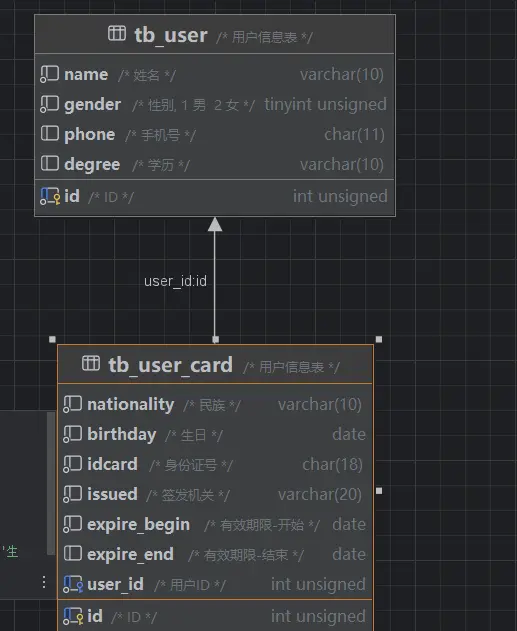
场景: 用户表(基本信息+身份信息)
一个人只能拥有一个身份证:
在任意一方加入外键,关联另外一方的主键,并且设置外键为唯一的(UNIQUE)
如果重复了,就相当于一个用户有了几个身份,有几张身份证,所以需要加入unique的关键字
1 | create table tb_user( |
1 | create table tb_user_card( |
一对多
场景:部门与员工的关系(一个部门下有多个员工)
实现方法:在数据库中多(n)的一方增加一个字段,这个字段关联一(1)的一方的主键。
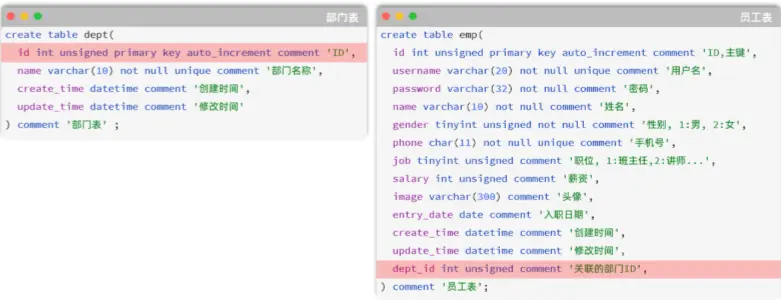
上图的
emp员工表的dept_id字段,关联的是dept部门表的id。部门表是一的一方,也称为父表,员工表是多的一方,称之为子表。
当我们删除1号部门时:

但是,员工表中所属1号部门的员工还存在:
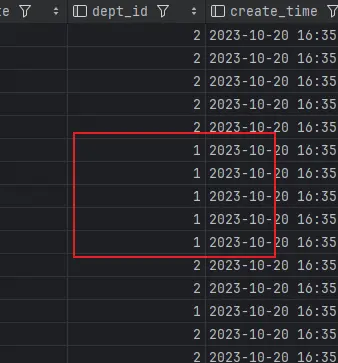
- 此时,就出现数据的不完整、不一致了。
为什么会出现这种情况呢?
因为只是在逻辑层面完成了其中的联系,但是数据库层面没有,也就是数据库不知道。
这时我们可以使用前面提到的外键约束来解决。
外键
外键约束:让两张表的数据建立连接,保证数据的一致性和完整性。
对应的关键字:foreign key
1 | -- 创建表时指定 |
在添加了外键关系后,将无法删除相关联的表:

报错为不能删除父表的行。
但是如果我们删除没有相关联的15的行:


是可以的。
物理外键与逻辑外键
物理外键
- 概念:使用
foreign key定义外键关联另外一张表。 - 缺点:
- 影响增、删、改的效率(需要检查外键关系)。
- 仅用于单节点数据库,不适用于分布式、集群场景。
- 容易引发数据库的死锁问题,消耗性能。
- 概念:使用
逻辑外键
- 概念:在业务层逻辑中,解决外键关联
- 通过逻辑外键,就可以很方便的解决上述问题
在现在的企业开发中,很少会使用物理外键,都是使用逻辑外键。 甚至在一些数据库开发规范中,会明确指出禁止使用物理外键foreign key。
多对多
案例:学生与课程的关系,一个学生可以选修多门课程,一门课程也可以供多个学生选择。
如果在学生表中增加一个属性来存放课程信息,因为一个学生会选修多门课程,所以一个属性显然是不够的,对于课程表同理,这时我们就应该创建一个中间表
实现:建立第三张中间表,中间表至少包含两个外键,分别关联两方主键:
1 | create table tb_student( |
1 | create table tb_course( |
中间表:
1 | create table tb_student_course( |
关系如下:
多表查询
了解了多表关系,但实际使用中肯定少不了对他们的查询,所以这一小节我们就来实践如何多表查询。
基本查询
以部门表和员工表为例
基本语法:
1 | select 字段列表 from 表1, 表2; |
查询用户表和部门表中的数据:
1 | select * from emp , dept; |

查询了大量数据,总共150条记录,而这其实就是员工表所有的记录(30行)与部门表所有记录(5行)的所有组合情况,这种现象称之为笛卡尔积。
在SQL语句中,如何去除无效的笛卡尔积呢?只需要给多表查询加上连接查询的条件即可。
连接查询
给表起别名
给表起别名可以简化书写
1 | select 字段列表 from 表1 as 别名1 , 表2 as 别名2 where 条件 ... ; |
起了别名之后便不能再使用原来的表明了。
内连接
内连接查询:查询两表或多表中交集部分数据。
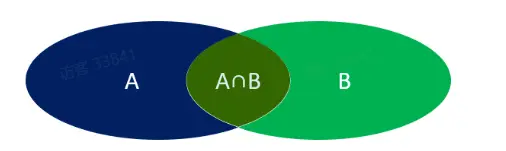
内连接从语法上可以分为:
隐式内连接
显式内连接
隐式内连接语法:
1 | select 字段列表 from 表1 , 表2 where 条件 ... ; |
显式内连接语法:
1 | select 字段列表 from 表1 [ inner ] join 表2 on 连接条件 ... ; |
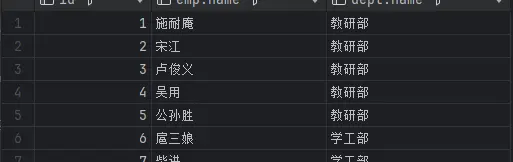
- 询所有员工的ID,姓名,及所属的部门名称
隐式内连接实现
1 | select emp.id, emp.name, dept.name from emp , dept where emp.dept_id = dept.id; |
显式内连接实现
1 | select emp.id, emp.name, dept.name from emp inner join dept on emp.dept_id = dept.id; |
- 查询 性别为男, 且工资 高于8000 的员工的ID, 姓名, 及所属的部门名称
隐式内连接实现
1 | select emp.id, emp.name, dept.name from emp , dept where emp.dept_id = dept.id and emp.gender = 1 and emp.salary > 8000; |
显式内连接实现
1 | select emp.id, emp.name, dept.name from emp inner join dept on emp.dept_id = dept.id where emp.gender = 1 and emp.salary > 8000; |
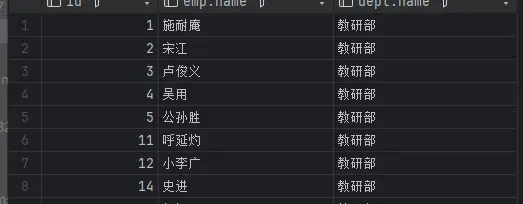
在多表联查时,我们指定字段时,需要在字段名前面加上表名,来指定具体是哪一张的字段。
如:emp.dept_id。
外连接
左外连接
1 | select 字段列表 from 表1 left [ outer ] join 表2 on 连接条件 ... ; |
左外连接相当于查询表1(左表)的所有数据(左外连接就会保存左表的数据,右外连接就保存右表的数据),当然也包含表1和表2交集部分的数据。
查询员工表所有员工的姓名, 和对应的部门名称 (左外连接)
1 | select e.name,d.name from emp e left join dept d on e.dept_id = d.id; |
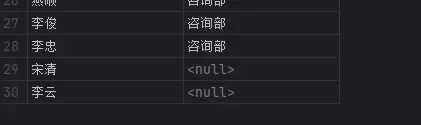
外连接可以展示出null值的,但是内连接是不可以的。
右外连接
1 | select 字段列表 from 表1 right [ outer ] join 表2 on 连接条件 ... ; |
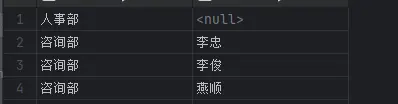
右外连接相当于查询表2(右表)的所有数据,当然也包含表1和表2交集部分的数据
- 查询部门表所有部门的名称, 和对应的员工名称 (右外连接)
1 | select d.name,e.name from emp e right join dept d on e.dept_id = d.id; |
- 查询工资高于8000的所有员工的姓名, 和对应的部门名称 (左外连接)
1 | select e.name,d.name from emp e left join dept d on e.dept_id = d.id where e.salary>8000; |
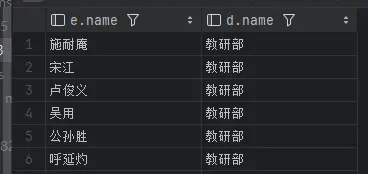
左外连接和右外连接是可以相互替换的,只需要调整连接查询时SQL语句中表的先后顺序就可以了。而我们在日常开发使用时,更偏向于左外连接。
子查询
SQL语句中嵌套select语句,称为嵌套查询,又称子查询。
1 | SELECT * FROM t1 WHERE column1 = (SELECT column1 FROM t2 ...); |
子查询外部的语句可以是insert/update/delete/select的任何一个,最常见的是select。
根据子查询结果的不同分为:
- 标量子查询(子查询结果为单个值 [一行一列])
- 列子查询(子查询结果为一列,但可以是多行)
- 行子查询(子查询结果为一行,但可以是多列)
- 表子查询(子查询结果为多行多列[相当于子查询结果是一张表])
子查询可以书写的位置:
- where之后
- from之后
- select之后
子查询的要点是,先对需求做拆分,明确具体的步骤,然后再逐条编写SQL语句。 最终将多条SQL语句合并为一条。
标量子查询
子查询返回的结果是单个值(数字、字符串、日期等),最简单的形式。
1 | -- 标量子查询 |
子查询只能查询出一个数据(一行一列):
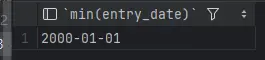
最终结果:

列子查询
子查询返回的结果是一列(可以是多行)。
1 | -- A. 查询 "教研部" 和 "咨询部" 的所有员工信息 |
子查询出来的是一列:
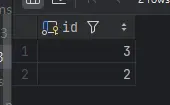
最终结果:
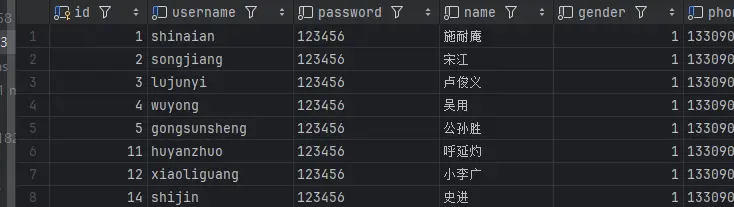
行子查询
子查询返回的结果是一行(可以是多列)。
1 | -- 行子查询 |
子查询的结果是一行:
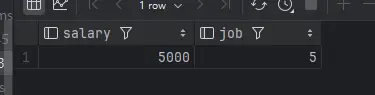
最终结果:

这样的sql代码可以看出行的列数越多,他会变得非常复杂,性能很差,如何优化呢??
把冗余的条件剔除放在外面即可极大缩短代码长度:
1 | -- 4.优化 |
表子查询
子查询返回的结果是多行多列,常作为临时表。
1 | -- 表子查询 |
子查询返回的结果是表:
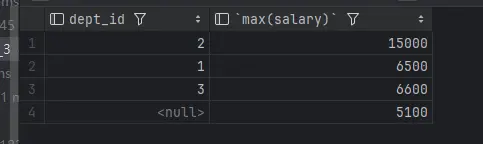
可以通过逻辑得出将两个表中salary,dept_id相等的员工信息查询出来,明显是内连接的形式:
